
Smart Lighting Installation: Complete Guide to Reducing Energy Waste by 30%
Ads
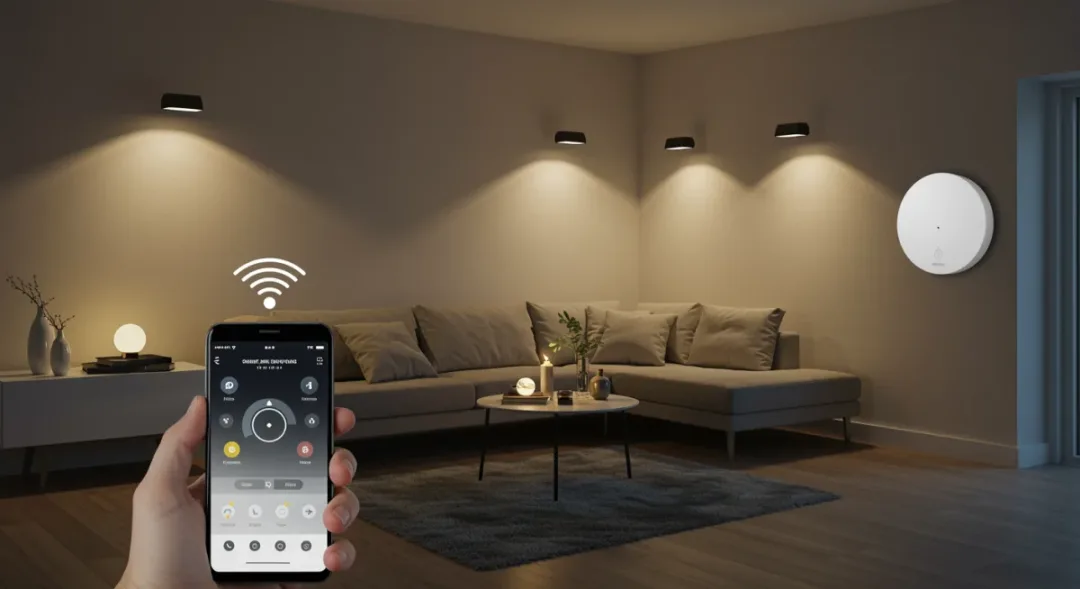
Smart lighting installation transforms traditional homes into energy-efficient spaces by leveraging automated controls, LED technology, and intelligent scheduling to reduce energy consumption by up to 30% while enhancing convenience and comfort.
Ads
Imagine walking into your home after a long day at work, and the lights automatically adjust to a warm, relaxing glow. Now imagine those lights also slash your electricity bills by nearly a third while you barely lift a finger. This isn’t some futuristic fantasy—it’s the reality that smart lighting installation creates for thousands of American homeowners right now. The technology has matured significantly, becoming more affordable and accessible than ever before. Whether you’re building a new home or upgrading your current space, understanding how to properly install and configure smart lighting systems can be the difference between modest savings and dramatic reductions in your energy footprint. This guide walks you through every step of the process, from selecting the right equipment to programming automation that works seamlessly with your lifestyle.
Ads
Understanding Smart Lighting Technology
Before diving into installation, grasping the fundamental technology behind smart lighting helps you make informed decisions. At its core, smart lighting replaces traditional incandescent bulbs with LED alternatives that consume up to 75% less energy for the same brightness. But the real magic lies in the connectivity—these bulbs communicate with each other and with a central hub or directly through your Wi-Fi network, allowing unprecedented control over your home’s illumination.
The communication protocols matter significantly for your setup. Wi-Fi bulbs offer straightforward installation without additional hardware, making them ideal for beginners. However, they can congestion your network if you plan to install many bulbs throughout your home. Zigbee and Z-Wave protocols require a separate hub but create a more robust mesh network where each bulb can relay signals to others, extending range and improving reliability. Thread technology represents the newest entrant, promising even better interoperability and lower power consumption.
Key Components of a Smart Lighting System
- Smart Bulbs: The foundation of your system, these LED bulbs connect to your network and can be controlled individually or in groups
- Smart Switches: Replace traditional wall switches to maintain control even when the bulb is turned off at the wall
- Central Hub: For Zigbee, Z-Wave, or Thread systems, the hub serves as the bridge between your bulbs and home network
- Voice Assistants: Integration with Alexa, Google Assistant, or Siri enables hands-free control
- Motion Sensors: Detect presence to automatically turn lights on or off as you enter and leave rooms
Understanding these components prevents common mistakes homeowners make when starting their smart lighting journey. Many assume they need everything at once, but building your system incrementally often yields better results as you learn what actually works in your specific living spaces.

Planning Your Smart Lighting Setup
Successful smart lighting installation begins long before you purchase your first bulb. Taking time to map out your home’s lighting needs prevents wasted money on equipment that doesn’t fit your actual requirements. Start by walking through each room and noting where lights currently exist, how they’re controlled, and when those lights are typically used throughout the day.
Consider the natural light each room receives. A south-facing kitchen with large windows needs different smart lighting programming than a basement home office that never sees daylight. Mapping these light patterns helps you determine which rooms benefit most from automation and scheduling features. The goal isn’t simply to add technology—it’s to solve real lighting needs while maximizing energy savings.
Room-by-Room Assessment Guide
- Living Areas: Focus on ambient lighting with dimming capabilities and scene presets for different activities
- Kitchens: Task lighting over work areas should be bright and adjustable, while ambient light can be warmer and lower
- Bedrooms: Prioritize gradual wake-up simulations and sleep-friendly color temperatures
- Bathrooms: Bright, cool lighting for grooming tasks, with motion-activated night lighting options
- Hallways and Entryways: Motion sensors provide convenience and energy savings by eliminating forgotten lights
Document your findings in a simple spreadsheet or notebook. This reference becomes invaluable when it’s time to purchase equipment and configure your system. Budget planning should account not just for bulbs and hubs, but for any smart switches that might be needed to replace traditional controls.
Choosing the Right Smart Bulbs and Fixtures
The market overflows with smart lighting options, making selection feel overwhelming. However, focusing on a few key specifications helps narrow choices dramatically. Brightness, measured in lumens, matters more than wattage in LED systems—a 60-watt equivalent LED produces roughly 800 lumens, but consumes only about 9 watts. Color temperature, expressed in Kelvin, determines whether light feels warm and cozy or cool and energizing.
Color-changing bulbs offer maximum versatility, allowing you to shift from warm white in the evening to cooler tones during morning routines. These RGB bulbs cost more than single-color alternatives but provide flexibility that many homeowners find valuable. Consider whether you truly need full RGB capability or would be satisfied with tunable white bulbs that shift between warm and cool temperatures without colors.
Top Smart Bulb Features to Evaluate
- Brightness Range: Look for bulbs that dim smoothly down to at least 10% without flickering
- Color Rendering Index (CRI): Higher CRI values (90+) mean colors appear more accurately under the light
- Response Time: Quality bulbs respond instantly to commands without noticeable delay
- Compatibility: Ensure bulbs work with your preferred ecosystem (Alexa, Google Home, Apple HomeKit)
- Lifespan Rated: Quality bulbs should last 25,000 hours or longer, translating to decades of normal use
Brand reputation matters more in smart lighting than in traditional bulbs. Lesser-known manufacturers often deliver acceptable hardware but skimp on software quality, leading to connectivity issues, app crashes, or discontinued support. Established brands like Philips Hue, LIFX, and Tuya-based bulbs typically offer better long-term reliability despite higher upfront costs.
Installation Process and Setup
With planning complete and equipment selected, installation day arrives. For most smart bulbs, the physical installation mirrors replacing any standard bulb—simply screw the smart bulb into the existing fixture. Smart switches require more involved electrical work, typically necessitating a licensed electrician if you’re not comfortable working with household wiring. However, starting with bulbs only lets you experience smart lighting benefits immediately while planning more comprehensive upgrades.
After physical installation, the app setup process begins. Download the manufacturer’s app and create an account. Most apps guide you through adding devices automatically, using your phone’s Bluetooth or Wi-Fi to discover nearby bulbs. This discovery process sometimes takes several minutes—patience matters here. Once discovered, rename each bulb to reflect its location (e.g., “Living Room Lamp” rather than “Bulb 1”) to make voice commands and automation much more intuitive.
Initial Setup Checklist
- Download and install the manufacturer app on a reliable mobile device
- Create an account and log in before adding any devices
- Name each bulb descriptively during the setup process
- Group related bulbs (e.g., all living room lights) for easier control
- Connect the app to your voice assistant if desired
- Test each bulb individually before creating any automation
Network configuration plays a crucial role in system reliability. Ensure your Wi-Fi router sits centrally in your home, or consider adding mesh network nodes to eliminate dead zones. For Zigbee or Z-Wave systems, place the hub in an open location away from interference sources like microwave ovens or cordless phones. Taking these environmental factors seriously prevents the frustration of bulbs that randomly go offline.
Programming and Automation Strategies
Installation without automation wastes much of what makes smart lighting valuable. The real energy savings come from lights that respond automatically to your presence, time of day, and ambient conditions. Effective automation requires understanding triggers, actions, and conditions—the building blocks of any smart lighting rule.
Time-based schedules provide the simplest starting point. Set lights to turn off at times when everyone typically leaves the house, and to turn on before arrival during winter months when darkness comes early. However, rigid schedules feel unnatural and often lead to frustration when routines change. Motion-based triggers create more dynamic automation that feels responsive rather than robotic.
Effective Automation Rules to Implement
- Vacancy Detection: Turn off all lights automatically when no motion is detected for 30-60 minutes
- Sunrise Simulation: Gradually brighten bedroom lights to simulate natural dawn waking
- Away Mode: Randomize light patterns while traveling to simulate occupancy
- Natural Light Compensation: Reduce artificial light when windows provide sufficient daylight
- Activity-Based Scenes: Create one-touch presets for movie nights, reading, or dinner parties
Advanced users explore integration between lighting and other smart home systems. Connecting lights to door sensors means entryways illuminate automatically without switches. Linking to climate systems can adjust lighting based on heating or cooling demands. These cross-system automations create genuinely intelligent homes that respond to life rather than requiring constant manual input.
Maximizing Energy Savings
Achieving that 30% reduction in lighting energy waste requires more than simply installing smart bulbs—it demands thoughtful configuration and ongoing attention. The LED technology itself provides roughly 70-80% savings compared to incandescent lighting, but smart controls add another 10-15% by eliminating lights left on in empty rooms and optimizing brightness based on actual needs.
Dimming plays a larger role in energy savings than many realize. Running a bulb at 50% brightness uses roughly 50% of the power, but our eyes perceive this as significantly darker due to the logarithmic relationship between brightness and perceived light. This means you can often achieve satisfactory illumination at 60-70% of full brightness while enjoying proportional energy savings.
Energy Optimization Techniques
- Default to Lower Brightness: Set default brightness at 70-80% rather than 100% for most rooms
- Implement Strict Vacancy Rules: Never allow lights to remain on in unoccupied spaces
- Use Appropriate Color Temperatures: Warmer colors (2700K) feel comfortable at lower brightness levels
- Leverage Natural Light: Automate lights to stay off during daylight hours in sunny rooms
- Monitor Usage Patterns: Review weekly energy reports from smart lighting apps to identify waste
Phantom energy consumption affects some smart bulbs even when “off” because they maintain standby power for wireless communication. Look for bulbs rated with low standby power consumption, typically under 0.5 watts. While this seems minor, the cumulative effect across many bulbs adds up over months and years of continuous operation.
Troubleshooting and Maintenance
Even well-planned smart lighting systems occasionally experience problems. Understanding common issues and their solutions prevents small glitches from becoming major frustrations. Connectivity problems represent the most frequent complaint, often manifesting as bulbs that respond slowly or fail to respond entirely to commands.
Most connectivity issues stem from network congestion or interference. Reducing the number of devices on your Wi-Fi network, changing your router’s channel, or upgrading to a mesh network system typically resolves these problems. For Zigbee systems, interference from household devices like baby monitors or wireless keyboards sometimes causes issues—repositioning the hub or adding a Zigbee repeater helps.
Common Problems and Solutions
- Bulbs Not Responding: Power cycle the bulb by turning it off at the switch for 10 seconds, then retry
- Slow Response Times: Check network congestion and consider adding a dedicated hub for smart devices
- Bulbs Disappearing from App: Reset the bulb to factory settings and re-add it to the system
- Flickering at Low Brightness: Ensure the dimmer is compatible with smart bulbs—non-compatible dimmers cause this issue
- Automation Not Triggering: Verify motion sensors have fresh batteries and proper placement
Maintenance requirements for smart lighting remain minimal compared to traditional systems. Occasionally cleaning bulbs and fixtures prevents dust accumulation that reduces light output. Checking and updating firmware when manufacturers release updates ensures your system maintains compatibility with new features and security improvements. Most systems handle updates automatically, but occasionally checking ensures nothing slips through.
| Key Point | Brief Description |
|---|---|
| LED Technology | Smart LED bulbs consume 75% less energy than traditional incandescent bulbs while lasting 25,000+ hours |
| Automation Savings | Smart controls add 10-15% energy savings by eliminating lights in empty rooms and optimizing brightness |
| Protocol Selection | Wi-Fi bulbs suit beginners; Zigbee/Z-Wave systems offer better reliability for comprehensive home installations |
| Total Energy Reduction | Combined LED technology and smart controls can reduce lighting energy costs by 30% or more |
Frequently Asked Questions
How much does a complete smart lighting system cost for an average home?▼For a typical two-bedroom home, a basic smart lighting setup costs between $150 and $400, including 10-15 bulbs and a hub if needed. Premium systems with color-changing bulbs and advanced features can run $500-1000+. The investment typically pays for itself within 2-3 years through energy savings alone.
Can I install smart lighting myself, or do I need an electrician?▼Smart bulbs install exactly like regular bulbs—simply screw them in—so most homeowners handle this themselves. Smart switches require working with household wiring and typically need an electrician for safe installation. Starting with bulbs only lets you enjoy benefits immediately while planning switch upgrades.
Will smart lighting work during power outages?▼Smart bulbs require power to function—no battery backup exists in standard models. During outages, they’ll remain off regardless of programming. However, basic manual switches controlling power to fixtures will restore functionality once power returns. Some systems offer battery-backup hubs that maintain automation rules during outages.
How do smart lights affect my Wi-Fi network performance?▼Wi-Fi smart bulbs consume minimal bandwidth—roughly 1-2 Mbps during active use—but the cumulative effect of many bulbs can congestion your network. Using a separate hub (Zigbee/Z-Wave) or ensuring your router handles many devices prevents performance issues. Quality mesh networks handle dozens of smart devices without noticeable impact.
What’s the expected lifespan of smart LED bulbs?▼Quality smart LED bulbs rated at 25,000 hours last approximately 25 years with typical use (3-4 hours daily). However, smart components may fail before the LED elements, so manufacturer warranty matters. Philips Hue bulbs, for example, warrant LEDs for 25,000 hours and electronics for 2-3 years.
Conclusion
Smart lighting installation represents one of the most accessible paths to meaningful home energy reduction. The technology has matured beyond novelty status, delivering genuine value through lower electricity bills, enhanced comfort, and unprecedented control over your home environment. Achieving that 30% energy reduction requires thoughtful planning, appropriate equipment selection, and automation that responds to your actual lifestyle rather than rigid schedules. Start with a few bulbs in high-traffic areas, learn what works in your space, and expand gradually as you discover new possibilities. The journey toward an intelligently lit home unfolds one room at a time, and each step brings you closer to the efficient, responsive living space that modern technology makes possible. Your electricity bill—and the environment—will thank you for making the switch.
Written by
Lucas Bastos
Lucas Bastos writes about home for insider.onlyshein.com. Each article explains how things work, compares published details such as prices, policies and program rules, and points readers to the official source before they decide.